NutriMotion supports Apple Watch and Wear OS companion experiences for nutrition, strength workouts and cardio, including route maps and directions where supported.
Back to Features
Feature guide
NutriMotion on your wrist
NutriMotion supports Apple Watch and Wear OS so daily nutrition, strength training and outdoor cardio can stay close to your wrist. Follow routes over the map, receive directions, log workouts and keep supported data connected with the phone app.
Apple WatchWear OSWorkout loggingRoute directions
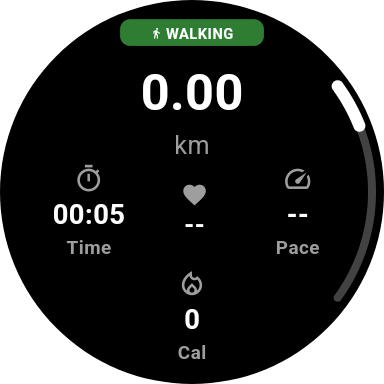
Wear OS
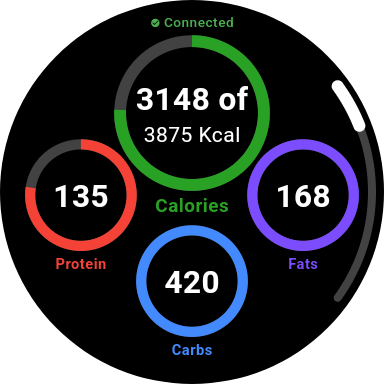
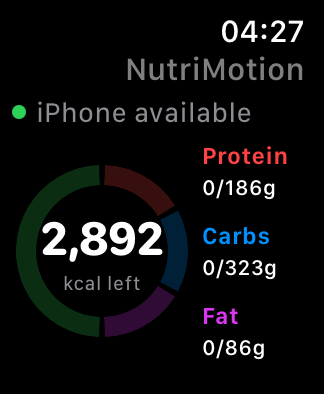
The Apple Watch and Wear OS companion experiences can show daily stats and nutrition information so users do not always need to open the phone app for a quick check.
Apple Watch
NutriMotion watch app includes workout views, weight workout support and training plan log views, making it easier to interact with training while away from the phone.
Cardio and GPS
Wearable support connects with cardio workflows on Apple Watch and Wear OS, including the route over a map, directions on your wrist and phone-watch communication.
Sync and offline handling
The watch-side implementation includes syncing behaviour and offline pending workout handling, so watch interactions can be queued and synced back where supported.
Questions about wearables
Install the matching NutriMotion watch app and follow the connection steps for Apple Watch or Wear OS. Keep the phone and watch apps up to date and signed into the required account.
Yes. Open NutriMotion on your watch and choose the cardio activity you want to start. On Apple Watch, use the activities under Start on Apple Watch, such as Running or Walking. Grant any requested activity and location permissions before starting.
Check that the phone and watch are nearby, both apps are installed and up to date, and the phone app has been opened recently. Then go to Home, menu, Wear OS Device and confirm the connection state. If cardio tracking is involved, also check location permissions.
No. The Apple Watch and Wear OS apps complement the phone app. The phone remains the main place for full nutrition logging, detailed setup, progress review, settings and account management.
Related features
See how wearables fits into the full app
NutriMotion connects food, workouts, cardio, progress and social tools so each area supports the others.