No. NutriMotion includes calorie and macro tracking, but it also covers workouts, training plans, GPS cardio, body metrics, progress trends, custom dashboards, friends, groups, Wear OS support, health data connections, and strength progression.
All-in-one fitness tracker
One app for food, workouts and progress
Most fitness apps focus on one job. NutriMotion brings nutrition, workouts, route planning, GPS cardio, body measurements, wearables and social features into one place.
Nutrition
Workouts
Cardio
Progress
Dashboard
Social
and more
Feature coverage
NutriMotion vs single-purpose apps
Most apps are built around one job: tracking calories, logging gym sessions, or recording cardio. NutriMotion connects food, lifting, route planning, cardio, body metrics, Apple Watch, Wear OS and social in one place.
Yes
Limited / varies
No
| Feature | NutriMotionall-in-one | Calorie trackersmeals, macros, weight | Gym trackerslifting, routines, PRs | Cardio trackersGPS, routes, activity |
|---|---|---|---|---|
| Nutrition | ||||
| Meal-based diaryBreakfast, lunch, dinner, snacks | ||||
| Calories & macrosGoals, totals, meal breakdowns | ||||
| Barcode scannerFast packaged-food lookup | ||||
| Nutrition label scannerScan the nutrition table itself, no barcode needed | ||||
| Micronutrient detailVitamins, minerals, fibre, fats, caffeine | ||||
| Smart food historyMeal-aware suggestions from repeat logging | ||||
| Custom foodsSave foods missing from databases | ||||
| Recipes by weightLog cooked portions by grams, not just servings | ||||
| Reusable meal plansPlan meals across the week, apply to diary | ||||
| Water trackingHydration logged beside food | ||||
| Exercise caloriesActivity shown inside the diary | ||||
| Step adjustmentStep calories handled in context | ||||
| Strength training | ||||
| Set, rep & weight logsFull lifting history per exercise | ||||
| Custom routinesBuild your own split or workout structure | ||||
| Training plansStructured programmes, not just loose logs | ||||
| Exercise analyticsGraphs, trends, history, and personal bests | ||||
| Workout coachSuggested weights using nutrition, recovery, and previous sets | ||||
| Strength rankings & XPProgression beyond raw numbers | ||||
| Muscle coverage mapSee which body areas are being trained | ||||
| Cardio & GPS | ||||
| GPS cardioRunning, cycling, walking, hiking | ||||
| Route discoveryGenerate nearby routes to run, walk, cycle or hike | ||||
| Custom routesCreate and save a route to follow | ||||
| Shared routesOpen and follow a route shared by another user | ||||
| Route directionsFollow mapped directions during an activity | ||||
| Route summariesMaps, distance, duration, pace | ||||
| Routes on your watchRoute map and directions on supported watches | ||||
| Progress & body metrics | ||||
| Weight graphsBody weight over time with goal weight | ||||
| Body measurementsWaist, chest, arms, legs & custom | ||||
| Average calorie trendsIntake vs target across the week | ||||
| Platform & dashboard | ||||
| Fitness dashboardDaily progress and fast access to key actions | ||||
| Android home widgetsNutrition summary on your home screen | ||||
| Apple Watch & Wear OSStats, workouts, routes and cardio from your wrist | ||||
| Health data syncSteps, weight, and supported health sources | ||||
| Social & sharing | ||||
| Fitness profileAvatar, bio, streaks, badges, ranking | ||||
| Friends & groupsPrivate spaces, not just public followers | ||||
| Group chat & goalsShared space to talk, set goals, and stay accountable | ||||
| Shared training plansSend programmes others can import | ||||
| Food & workout log sharingShare foods, recipes, and completed sessions | ||||
| Privacy-controlled share cardsShare selected stats, not your full private logs | ||||
| Invite links & QR codesFriends and groups through links or QR | ||||
Calories adjust as you train
Log a run, a lift, or hit your step count. NutriMotion adds the calories burned directly to your diary. No manual estimates, no guessing intensity. Everything updates together.
Learn more →Your coach uses everything
NutriMotion's workout coach pulls from your training history, nutrition logs, and recovery to suggest weights for your next session. The more you log, the smarter it gets.
Learn more →One dashboard, everything in it
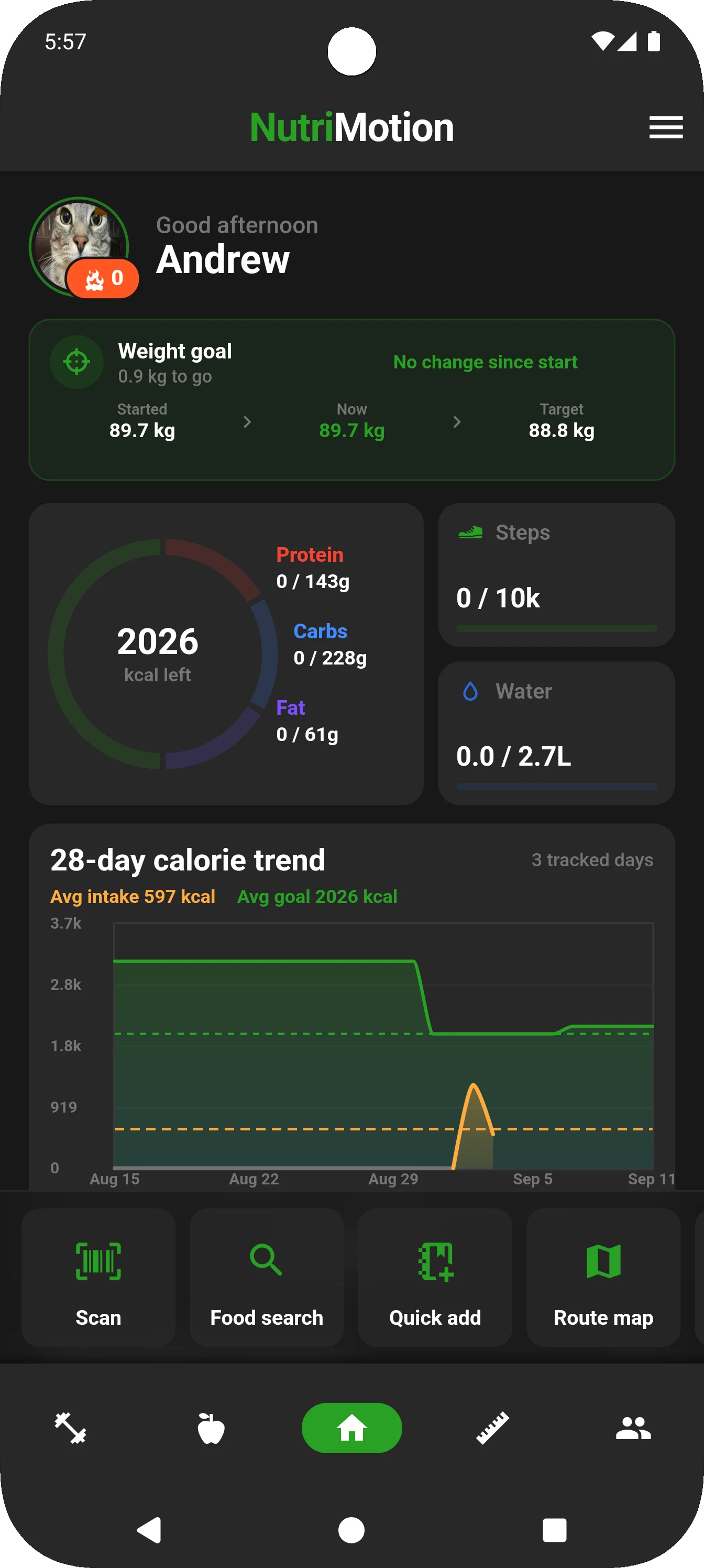
Open the app to see calories, macros, weight goals, steps, water and trends, then jump straight into food logging, workouts or the Route Map.
Learn more →Share, compete, and stay accountable
Send recipes, food logs, and completed workouts to friends. Create groups, set shared goals, and run competitions, all without exposing your private data to people outside your circle.
Learn more →Comparison questions
NutriMotion is not just a set-and-rep notebook. It combines structured training plans, routine building, muscle targeting, workout logs, exercise graphs, personal bests, rankings, social features, nutrition tracking, body metrics, and dashboard customisation in one app.
Separate apps can work, but they split the picture. NutriMotion keeps nutrition, training, cardio, body metrics, and progress trends together so users can see how eating, training, activity, and body changes relate over time.
Yes. Beginners can start with simple food logging, workout logging, goals, and progress tracking. More advanced users can use custom routines, training plans, macro targets, muscle analysis, exercise graphs, rankings, groups, and deeper nutrition data.
Put NutriMotion on the left or visually highlight it first in comparison tables. Use clear green ticks and red crosses instead of weak text labels where possible. The page should make feature coverage easy to scan rather than forcing users to read long table cells.